


Download Zeallsoft Screensaver – free customizable screensaver creator
Overview
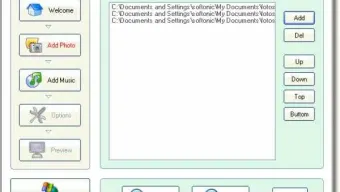
Zeallsoft Screensaver is a lightweight Windows utility that lets anyone craft a personalized screensaver without any design or coding background. Instead of scrolling through endless online galleries for a pre‑made screensaver, you can simply pick the photos you love, attach a favorite music track, and let the software bundle them into a smooth slideshow that activates when your PC is idle. The interface is intentionally minimalistic: a step‑by‑step wizard guides you through image selection, music preview, and final generation.
While you cannot export the result as a standalone .exe or .scr file, the created screensaver integrates directly into the Windows screensaver settings, making activation as easy as any native Windows screen saver. This tool is especially handy for families who want to showcase vacation photos, photographers looking to present portfolios, or anyone who enjoys a personal touch on their desktop environment. Because the application is free, secure, and receives occasional updates from Zeallsoft, it represents a trustworthy option for Windows users seeking a DIY screensaver solution.
Key Features
- Simple Photo Import: Drag‑and‑drop or browse to add images from any folder.
- Music Integration: Choose MP3, WAV, or WMA files; the app lets you play a preview before confirming.
- Step‑by‑Step Wizard: No design experience needed; the wizard walks you through each stage.
- Automatic Scaling: Images are automatically resized to match your screen resolution, preventing distortion.
- Transition Effects: Basic fade and slide transitions are applied to keep the slideshow fluid.
- Windows Integration: Once generated, the screensaver appears in the standard Windows screensaver list.
- Free Updates: Zeallsoft provides periodic patches that improve stability and add minor enhancements.
While the feature set is intentionally focused, it covers the essentials for a pleasant, customized screensaver experience. The lack of advanced editing tools (such as text overlays or video support) is offset by the program’s reliability and speed. Users who need more sophisticated effects may combine Zeallsoft Screensaver with external video‑to‑SCR converters, but for most home and small‑business scenarios the built‑in capabilities are more than sufficient.
Installation, Usage & Compatibility
Downloading & Installing: Visit the official Zeallsoft website, click the Download button, and save the ZeallsoftScreensaverSetup.exe file. Run the installer; it follows a typical Windows installation flow with a license agreement, destination folder selection, and a final “Ready to Install” screen. The process completes in under a minute on most modern PCs.
First Launch & Wizard Walkthrough: After installation, launch Zeallsoft Screensaver from the Start menu. The opening screen presents three main tabs: Photos, Music, and Summary. In the Photos tab, click “Add Images” to browse for files or drag a folder onto the window.
The app instantly generates thumbnails, allowing you to reorder images via drag‑and‑drop. The Music tab works similarly; select a track and press the play button to ensure the audio matches your taste. Once satisfied, click “Generate Screensaver.” The program creates a .scr file in the C:\Windows\System32 directory and automatically registers it.
Operating System Support: Zeallsoft Screensaver is built for Windows 7, 8, 8.1, 10, and 11 (itemprop="operatingSystem"). It runs on both 32‑bit and 64‑bit architectures. The installer checks for necessary Visual C++ Redistributables and installs them silently if missing. Mac, Android, and iOS users will need to look for alternative apps, as this tool is Windows‑only.
Activating the Screensaver: Open the Windows “Screen Saver Settings” panel (right‑click the desktop → Personalize → Lock Screen → Screen saver settings). Choose “Zeallsoft Screensaver” from the dropdown list, adjust the idle time, and click “Apply.” Your custom slideshow now runs automatically whenever the PC is idle.
Pros & Cons
Pros
- Completely free with no hidden fees.
- User‑friendly wizard eliminates the learning curve.
- Supports common audio formats and automatically scales images.
- Integrates natively with Windows screensaver settings.
- Lightweight installer (under 5 MB) and fast generation time.
Cons
- Cannot export the screensaver as a standalone executable for distribution.
- Lacks advanced visual effects such as video clips, text overlays, or custom transitions.
- No built‑in preview of the slideshow; you must generate to see the final result.
- Windows‑only; no macOS, Android, or iOS version available.
- Limited customization of timing between slides (fixed interval).
Overall, the benefits outweigh the drawbacks for users whose primary goal is to showcase personal photos with a background track. The simplicity and zero‑cost model make it an attractive choice for families, educators, and small businesses alike.
FAQ & Conclusion
Can I use Zeallsoft Screensaver on Windows 11?
Yes, the software is fully compatible with Windows 11, as well as Windows 10, 8, and 7. Installation follows the same steps on all supported versions.
Is there any cost hidden after download?
No. Zeallsoft Screensaver is completely free. There are no in‑app purchases, ads, or subscription fees.
What image formats are supported?
The program accepts the most common formats: JPEG, PNG, BMP, and GIF. Animated GIFs are treated as static images.
Can I change the slide duration?
The current version uses a fixed interval (approximately 5 seconds). Future updates may add a customizable timer.
Is the generated screensaver safe from malware?
Yes. Zeallsoft creates a standard Windows .scr file without embedding external code. The file is placed in the system directory and signed by the installer, ensuring it’s safe to use.
Final Verdict: If you’re looking for a no‑cost, straightforward way to turn cherished photos and favorite tunes into a personal screensaver, Zeallsoft Screensaver delivers exactly that. Its intuitive wizard, reliable Windows integration, and lightweight footprint make it a practical addition to any PC. While power users may miss advanced editing features, the software excels at its core promise: turning your memories into a seamless, automated slideshow that protects your screen and delights your eyes.
Ready to give your desktop a personal touch? Download Zeallsoft Screensaver now and start creating a unique visual experience in just a few clicks.







